Mixing and mastering, with a guide beside you
From raw stems to a finished master. With the reasons.
Stemwise is a desktop studio for songs you have already recorded. An assistant proposes the mix and the master, explains every move in plain words, and leaves every decision to you.
Free and open source · MIT licencemacOS (Apple silicon)


- Twelve tracks you recorded.
- Tell it what the song should feel like.
- It works from measurements. It never hears your audio.
- A proposal arrives. Nothing has changed yet.
- Every change says what it is for.
- Compare. Keep what you like. One undo takes it back.
- Then read the mix like a map.
- Bounce the mix into one file.
- A second room, and one target: where the song is going.
- The assistant proposes a master too, module by module.
- The chain is yours: add, reorder and tune every module.
- Export. The ceiling is checked on the file itself.
Follow one song through the app.
01 · Bring the stems
Drop the tracks in. Say what the song should feel like.
Import WAV or AIFF stems, give each one a role (kick, lead vocal, pads) and write a short brief: the vocal must sit in front, dry drums. Add a reference track if you have one. Your files are never changed.

02 · Ask for a mix
A proposal arrives. Nothing has changed yet.
The assistant measures your tracks, drafts a mix, renders it, measures the result and corrects itself. What you get is a proposal: levels, EQ, compression, shared reverbs, and up to three creative ideas you can audition one at a time.
Switch between Current mix and Proposal while the song plays.

03 · Read why
Every change says what it is, and what it is for.
This is the part other tools skip. Each track in the proposal carries the problem that was measured, the technique used to fix it, and the exact values before and after. It reads like the notes an engineer would leave you.

The problem, measured
"Masked by the guitars around 2–4 kHz in the choruses" comes from an analysis of your tracks, not from a guess.
The technique, named
Cut the mud, add presence, lift the vocal in the choruses only. The same moves you could make by hand, on the same controls.
Your call, track by track
Apply all of it, only the tracks you tick, or none. An applied proposal is a single undo step.
04 · See the whole mix
Explain this mix: a map, and the same mix in words.
One view draws where every sound goes: tracks into groups, groups into the mix bus, copies sent to shared reverbs, who ducks under whom. Click any box and read what happens to it, in order.
It is read straight from your project. No AI call, no cost.


05 · Master and export
A second room for the last step.
Mastering is a different job, so it gets its own space. Pick where the song is going, streaming or CD, and work towards that loudness with the levels in front of you. The assistant can propose a chain here too, module by module, each with its reason.


A chain you build
EQ, match EQ, compressor, multiband, width, saturation, clipper, in the order you choose. Limiter and dither always close it.
Loudness you can read
Integrated LUFS and true peak against the target, and an honest A/B against your mixdown and your reference at the same loudness.
Export once, correctly
WAV, FLAC or AAC with tags. The peak ceiling is checked on the exported file itself.
Built for the person learning the craft, and for the one who already has it.
If you are learning
See how an engineer would treat your song, then try it yourself.
Controls are labelled in words (Mud, Presence, Air), units are always written, and a guided tour on a demo song walks you through the whole desk in fifteen steps.

If you do this for a living
A fast first pass you can audit, on a desk that is yours.
Free block chains, sidechains, parallel compression, automation per section. Lock the tracks the assistant must not touch, scope a request to one track, and overrule anything by hand.

An assistant, not an autopilot.
It never hears your audio
Only measurements, roles and your brief are sent. No sound, no file names, no song title.
Reversible, always
Nothing is destructive. Every change, yours or the assistant's, can be undone.
Your key, your cost
Connect your own OpenRouter account. Each request shows its estimated cost before you send it.
Works without it
The whole desk, the master room and Explain this mix need no AI at all.
Free and open source
Free for everyone. The code is yours to read.
Stemwise is open source under the MIT licence. Anyone can download it, use it, study it and change it, at no cost. There is no paid version, no subscription and no account to create.
The only cost you may meet is OpenRouter's
The assistant runs on AI models that you reach through your own OpenRouter account. What those models cost is set by OpenRouter and billed by OpenRouter to you, directly. Stemwise shows an estimate before each request and lets you set a spending cap.
If you never connect an account, everything except the assistant still works, for free.
The plain terms
- Nobody earns from this. I make no money from Stemwise: not from the app, and not from anything you spend on OpenRouter. No commission, no referral, no ads.
- No affiliation. Stemwise is an independent project. It is not affiliated with, endorsed by or sponsored by OpenRouter or any provider of AI models.
- Provided as is. The software comes with its strengths and its flaws, without warranty of any kind. It may contain bugs, and the costs it shows are estimates.
- No liability. To the extent the law allows, the author is not responsible for any damage or loss that comes from using it, including lost work, lost income, or charges from third-party services. You use it at your own risk: keep backups, and set a spending limit on your OpenRouter account.
The full terms are those of the MIT licence.
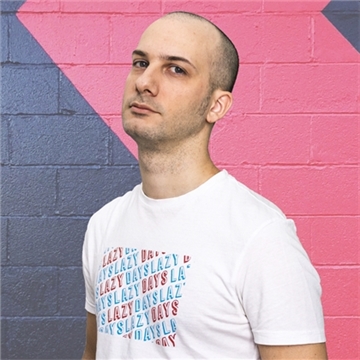
The author
Made with ❤️ by Piero De Tomi.
I am a software architect based in Trieste, Italy. I have been building digital products for more than ten years, and off the clock I am into electronics, music and hands-on making.
I built Stemwise because mixing and mastering are where I am weakest when I make my own songs. I wanted a tool that would help me finish a song myself and show me, move by move, what an engineer would do and why. I am sharing it freely in case it helps someone else learn the same way.
 pierodetomi.dev

Finish the song. Keep what you learned.
Free and open source · the guided tour works without an accountmacOS (Apple silicon)